SpacesGuide7 min read
Virtual Showroom for Furniture Stores: How to Put Your Showroom Online in 3D
What a 3D virtual showroom is, what customers can do inside it, how it gets built and where the link goes. A practical guide for furniture and interior stores.
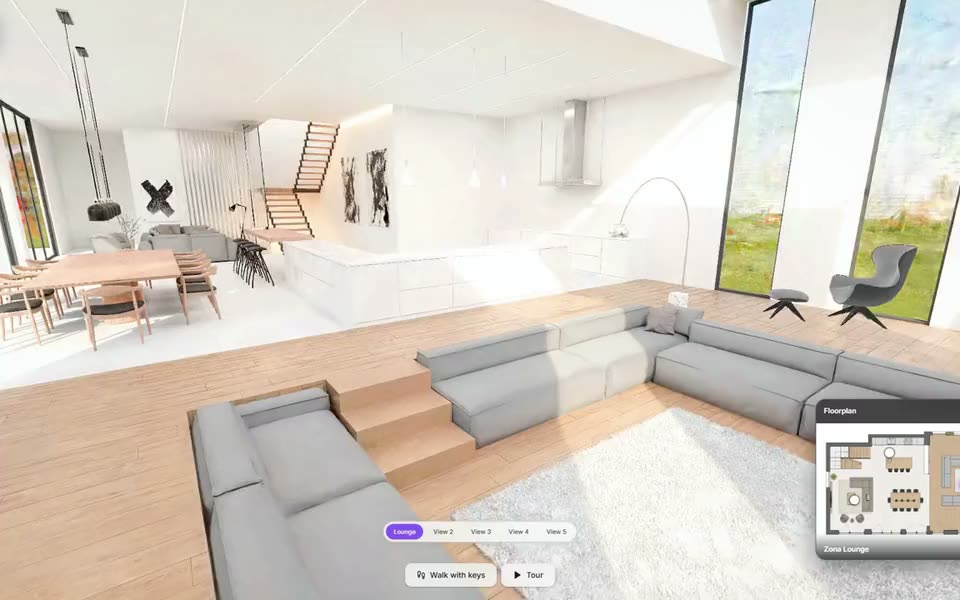
A furniture store sells with its floor. People walk around a sofa, sit on it, open a sideboard, see how the oak looks next to the lacquer. Online, the same store usually has a grid of photos. A virtual showroom brings the floor online: a 3D version of the shop that customers walk through from home, with the real pieces in it.
What a virtual showroom is
A virtual showroom is a three-dimensional space that opens in the browser, on a phone or a computer, with no app to install. The visitor moves through it the way they would in the store: they walk to a corner, turn around, get close to a piece. Unlike a gallery of photos, the space keeps its proportions, so a customer understands how big a table is next to the chairs and how a room is put together.
It is not a 360° photo tour. A 360° tour is a set of panoramas joined by arrows: you jump from one point to the next and look around. In a 3D showroom you move freely, and the products are objects rather than pixels in a photo, so they can change finish when the customer asks.
What customers can do inside
- Walk through the space at their own pace, or follow a tour of named views.
- Switch the finishes of the pieces on display: the fabric of a sofa, the wood of a table.
- Open a point of interest to read about a product, its sizes and its options.
- Keep a list of what they liked, with the totals.
- Ask questions inside the space and get the answers the store has written.
- Contact the store on WhatsApp with a message already written, without leaving the room.
On a phone the same link has a floor plan of the space and a compass that follows the way the phone is turned.
How it gets built
There are two ways to put a real shop in 3D. The usual one is to model it: the space is rebuilt in 3D from plans, measurements and photos, and the store's products are placed in it one by one with their real finishes. The result is clean and light, it loads quickly on a phone, and it can be rearranged when the collection changes.
The other way is to capture the space as it stands, photographing it from every angle and reconstructing it, for example with Gaussian Splatting. It reproduces the exact room, materials and light included, and it takes a visit and more processing. With Luxa Spaces the modelled showroom is the standard path and the 1:1 capture is quoted separately.
Where the link goes
- On the store's website, as a page or embedded in one.
- In WhatsApp and email, sent by the sales staff to whoever asked for the sofa in another colour.
- In the shop itself, as a QR code in the window or on a price tag.
- On social media, in the bio or under a post.
What the store learns
A showroom on the web can be measured. Luxa Spaces counts visits and augmented reality sessions, and shows the products opened most and the finishes customers try and finally keep. For a store, it is the first time it can see which pieces people stop at when nobody is watching.
Is it worth it for a small store?
A virtual showroom does not replace the physical one. It works best as the step before the visit: the customer arrives having seen the room, picked two finishes and knowing what to ask. It is also how a collection reaches someone who lives an hour away, and how a seasonal display stays online after it has been taken down.
Questions
- Do customers need an app or a headset?
- No. A virtual showroom built with Luxa Spaces opens in the browser on any phone, tablet or computer.
- How is a virtual showroom different from a 360° tour?
- A 360° tour is a set of panoramic photos you jump between, with the products fixed in the photo. A 3D showroom is a space you move through freely, and the products in it can be turned and change finish.
- Can the products change after the showroom is online?
- Yes. The pieces are separate 3D objects inside the space, so a finish or a product can be changed without rebuilding the room.
- Who builds the showroom?
- With Luxa Spaces, the Luxa team models the showroom and places the store's products in it. Capturing the real space 1:1 is available and quoted separately.
Put your showroom online.
We build it in 3D, with your products in it, and hand it over ready to share.
More from the blog