BoardsGuide6 min read
AI Product Photography from One Photo: Studio Shots, Colourways and Room Scenes
How to get the pictures a product needs, from a white studio shot to the same chair in four colours or in a living room, starting from one phone photo and without writing prompts.
A product needs many pictures: a clean one on white for the shop, the same piece in every colour, one in a room, the details, one for social. A photoshoot for each of them takes days. AI image tools can make them from a single photo, but most of them ask you to write prompts, and change things you did not ask to change.
What you can make from one photo
- A studio shot on a seamless white background, from a photo taken on a phone.
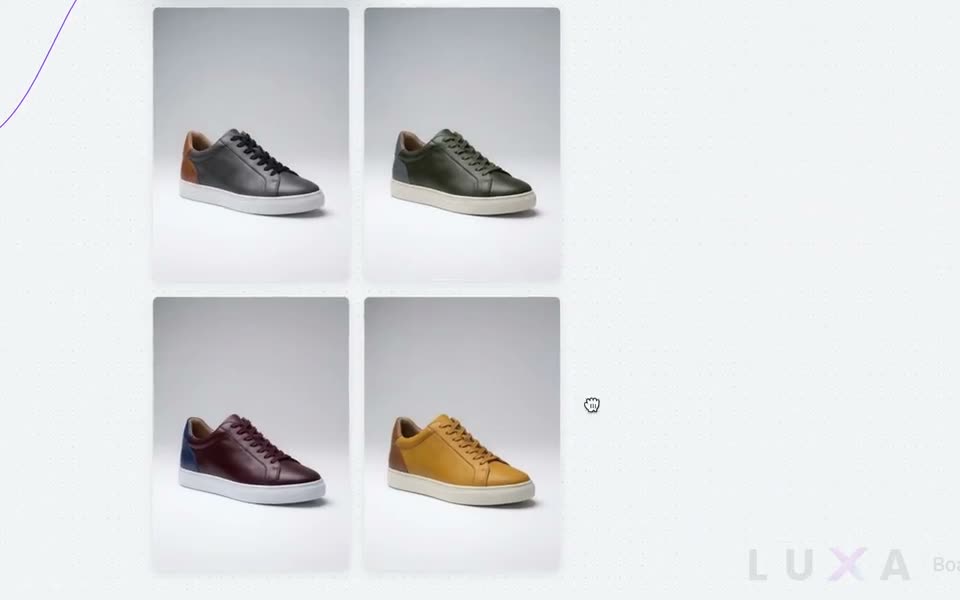
- Colourways: the same product in four colours or materials, everything else untouched.
- The product placed in a real room, on a surface or outdoors.
- Close-ups of the details, and the same shot with dramatic light.
- A sketch or a CAD drawing turned into a finished render.
- A textured 3D model from the photo, if you want the product in 3D and AR too.
Why prompts are the hard part
General AI image tools work from a written description. To get a usable product picture you describe the light, the framing and the background, and then ask the model not to touch the logo, the shape, the stitching. Every change is a new attempt, and the product drifts a little each time.
Luxa Boards works the other way round. You drop the photo on a board, connect it to a job from the menu, such as Studio shot, 4 Colourways or In a real room, and press play. The jobs are named after the work, so there is nothing to write, and each one is built to change only what it says.
How a board works
- 1Drop a product photo or a sketch on the board.
- 2Drag a wire from it and pick a job from the menu.
- 3Press play. Every job shows its price in credits before it runs.
- 4Chain the results: the studio shot feeds the colourways, the colourways feed the room scene.
Everything stays on the board, so the whole set of pictures for a product, and how each one was made, is in one place.
Who it is for
Designers and content creators who make product pictures for clients, brands that need images for a catalogue, and stores that receive one photo from the manufacturer and need six. Agencies use it to show a client a product in variants before anything is produced.
What it costs
Boards is available on every Luxa plan, the free one included. Generations use credits: packs start at $10 for 600 credits, and the Pro and Premium plans include credits every month. Every job shows its price before you press it, and what you upload and what comes back is yours to use commercially.
Questions
- Do I need to write prompts?
- No. Each job in Luxa Boards is a named node, such as Studio shot or 4 Colourways. You connect a photo to it and press play.
- Will the AI change my product?
- Each job is built to change only what it names: the background for a studio shot, the material for a colourway. Check the result, and run it again if a detail moved.
- Can I use the images commercially?
- Yes. What you upload and what comes back is yours, on every plan including the free one.
- Can a product photo become a 3D model?
- Yes. A board can turn a product photo into a textured 3D model, ready for a 3D viewer and AR.
The pictures, from one photo.
Open a board for free and try a job: no prompt to write.
More from the blog